Product Hunt exclusive

Start Xenqu without a card.
Let Xena do the chasing.

Xenqu collects the forms, documents, and data other people owe you. Xena sends the requests, checks what comes back, turns away the unreadable or expired uploads with a reason, and keeps chasing until the file is complete. You decide what you collect and what it is about - a new hire, a supplier, a vehicle, a property, a project. Nothing here is built for one department.

You get the documents. And the record of who asked, who answered, and when.

No card to start · cancel anytime · no sales calls or promotional emails
Your Product Hunt offer
  • 14-day free trial (Starter limits during the trial)
  • 100 bonus Xena credits
  • No credit card required to start
  • No sales calls or promotional emails
  • Code PH2026 - 25% off for your first year when you subscribe
Xenqu collects
Forms & signaturesIDs & credentialsTax & insurance docsPhotos & inspectionsApprovalsand more
What Xenqu does

Describe the collection once. Xena runs every case after that.

A case is one round of collecting on one file - and the file can be about anyone or anything you keep records on. A workflow is the process that collects it. You define both by talking to Xena, in your own words, then she works every open case in the background.

  1. 01

    Describe what you collect

    Tell Xena what you need, who owes it, and what it is about - a hire, a supplier, a truck, a building, a grant. She drafts the forms, uploads, stages, and acceptance rules in Workflow Studio for you to review and publish.

  2. 02

    Send the first request

    Start a case and Xena reaches whoever owes you the paperwork - applicant, office manager, inspector - by email or SMS, with a secure portal that shows them exactly what is required.

  3. 03

    Xena chases and checks

    She nudges on her own schedule, checks every upload against your requirements, and re-requests the glare-washed ID, expired certificate, or unusable inspection photo with a specific reason.

  4. 04

    You handle the exceptions

    Complete, correct cases land in your queue with a timeline of who asked, who answered, and when. Only judgment calls reach a human.

One real case, start to finish

Watch Xena reject a bad ID, accept a good one, and close the case.

A hiring example: the workflow in Studio, the request going out, a bad ID rejected with a reason, a clear one accepted and extracted, and the report at the end. The same loop works for a supplier's insurance certificate or a truck's inspection photos.
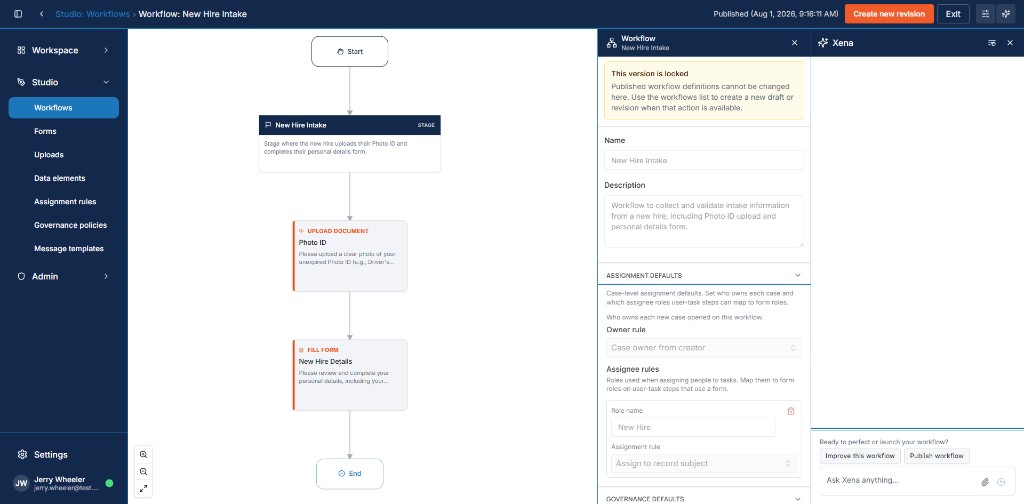
1 / 8Design the workflow
Your first ten minutes

Ten minutes in, you'll have watched Xena reject a bad ID.

No implementation project, no sales call. Describe what you need to collect, publish the workflow Xena drafts, and send the first request. Subscribe whenever you are ready and the workflows, cases, and records you built keep right on running - nothing to rebuild, nothing to migrate.

  • Describe a process you run by hand today
  • Review the workflow Xena drafts, then publish it
  • Send the first request to yourself or a teammate
  • Upload a deliberately bad photo and watch Xena reject it with a reason
  • Finish the case and download the overview report
See the full product tour

Ready when you are

No card now. Subscribe later with PH2026 for 25% off twelve months of subscription billing.